

User-Contributed Scripts
The following is a list of user-contributed scripts that can be freely downloaded and used in AstroPlanner V1.5.1 and after (except where noted). Note that the appearance of a script here in no way implies that it will run flawlessly. However, we try to do sanity checks on any new scripts appearing here. Note that scripts can only be created and used by registered (i.e. paid) users of AstroPlanner.
| To install a script:
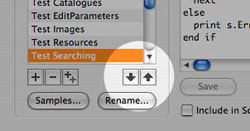
The best and easiest way is to use the Edit Scripts... menu command in AstroPlanner's Script menu. At the bottom of the list at the left is a button with a down-arrow. Click it and you'll be presented with a list of scripts to download. |
 |
Alternatively, you can do it manually:
- Download the text file by clicking the link below (you will probably need to right-click (control-click on Mac) and download the linked file).
- Quit from AstroPlanner if necessary.
- Move the downloaded text file to the "AstroPlanner Scripts" folder in the same folder as the AstroPlanner application. If that folder doesn't exist (i.e. you have never used scripting), you can create it manually.
- Run AstroPlanner. Select Edit Scripts... from the Script menu. The newly-downloaded script should appear in the list.
If you are a script author, please refer to the Scripting manual to find out how to publish and maintain your scripts on this page.
(For ascending alphabetic order, click here)
| Name | Date | Author |
| URL | Documentation | Min. Version |
| Description | ||
| Observation HTML | 2/5/10 2:10 PM | Paul Rodman |
| n/a | n/a | V1.6.1 |
| Output global observations in a given date range, as rows in an HTML table. Author: Paul Rodman, May 2008 Inspired by Paul Kemp Version 1.0 15 May 2008 First release. Version 1.1 15 May 2008 Sort observations by various methods. Version 1.2 15 May 2008 Option to restrict to specified site and/or telescope. Version 1.3 22 May 2008 Date and Time formatting options Global placeholders (for session info) Include observations only after 12pm on start date and before 12pm on the day after the end date. Version 1.4 22 May 2008 Add additional placeholder fields Version 1.5 23 May 2008 Add {{ID/Name}} and {{ID-Name}} Version 1.6 23 May 2008 Add Type substitutions field Version 1.7 24 May 2008 Add Moon and Sun placeholders Version 1.8 25 May 2008 Bug fixes Version 1.9 25 May 2008 [[DistanceFromHome]] + Home Site popup in dialog Version 1.10 26 May 2008 Fixed End Of Line problem in Windows Version 1.11 27 May 2008 Fix for Date format problem. Avoid blank placeholder names. Version 1.12 2 June 2008 Fix for HTML compatibility (converting special characters to correct HTML) Version 1.13 5 Feb 2010 Added ability to do a reverse sort Version 1.14 5 Feb 2010 Bug fix |
||
| Opposition Point | 1/28/10 2:01 PM | Paul Rodman |
| n/a | n/a | V1.6.1 |
| Find the opposition point (the point in the sky opposite the sun along the ecliptic). Add it as an object to the plan Paul Rodman, Jan 2010 V1.0 27 Jan 2010 Initial release V1.1 28 Jan 2010 If opposition point object already exists, update its value. |
||
| CCD Commander Export | 1/25/10 3:37 PM | Paul Rodman |
| n/a | n/a | V1.6.1 |
| This script exports the plan in a format suitable for CCD Commander. Paul Rodman, Jan 2010 V1.0 25 Jan 2010 Initial Release V1.1 25 Jan 2010 Minor changes (Juan Gonzalez) |
||
| Make A Plan | 3/21/09 1:56 PM | Carter Scholz |
| n/a | n/a | 1.6.1 |
| This script reads a text file of object IDs, searches for those IDs in installed AP catalogs, and generates a plan. Object IDs not found are displayed in a window and saved in a file. | ||
| NSOG Ratings | 2/19/09 8:45 AM | Paul Rodman |
| n/a | n/a | V1.6.1 |
| Add NSOG ratings to user-defined object field Requires the NSOG_Ratings.txt file available from: <http://www.ilangainc.com/astroplanner/NSOG/NSOG_Ratings.txt> Will add the rating to User Field 1. If you want to use another field, change the UserField constant to 1, 2, 3, or 4. V1.1 (10 June 2007). Handles empty lines in the ratings file. V1.2 (11 March 2007). Deletes entries already existing in the user field. V1.3 (19 Feb 2009). Does not delete existing entries. Replaces entries of form "*n" with "n*". |
||
| Show AltAz | 2/5/09 2:46 PM | Paul Rodman |
| n/a | n/a | V1.6.1 |
| Display the Alt/Az of the selected object Paul Rodman, Feb 2009 V1.0 5 Feb 2009 Initial release |
||
| SEDS Links | 1/30/09 9:39 AM | Paul Rodman |
| n/a | n/a | V1.6.1 |
| Put web links to the SEDS database into a user field. Any Mxxx, NGCxxxx or ICxxxx objects will get links. Paul Rodman, January 2009 (from an idea by Craig Starnes) V1.0 30 Jan 2009 Initial release |
||
| SkyTools 3 Obs Import | 1/25/09 7:11 AM | Paul Rodman |
| n/a | n/a | V1.6.1 |
| Imports SkyTools 3 observations. Optionally creates any site and telescope resources referenced, creates an object in the open plan for each observaed observation, and then creates observations corresponding to the SkyTools observations. Requires that you save your ST3 observations as a tab-separated text file: delimiter character: commas tabs pipes colons semicolons {drop down box} (select "tabs") select log entries: Matching log entries in browser object lists All object log entries in database all objects in this observing list {two drop down fields} Fields to export: {check boxes} Date/Time Observer Location Instrument Object Data Conditions Description Paul Rodman, January 2009 V1.0 25 Jan 2009 Initial release. |
||
| RTGUI Import | 1/13/09 7:28 PM | Paul Rodman |
| n/a | n/a | 1.6.1 |
| Import RTGUI data file Paul Rodman, Jan 2009 V1.0 13 jan 2009 Initial release |
||
| TheSky Catalogue Exporter | 12/4/08 11:58 AM | Paul Rodman |
| n/a | n/a | V1.6.1 |
| Export objects from an AstroPlanner catalogue to a .txt file that TheSky can import and create an .SDB catalog file from. Paul Rodman Dec 2008 V1.0 - 2 Dec 2008 Initial release V1.1 - 3 Dec 2008 Corrected problem with Dec sign V1.2 - 4 Dec 2008 Corrected assorted problems (I hope) |
||
| Current Epoch | 10/7/08 5:17 PM | Paul Rodman |
| n/a | n/a | V1.6.1 |
| Convert object coordinates from J2000.0 to current epoch. Store the status in User field 4 (changeable below) to make sure a second run of the script only converts previously unconverted objects. Paul Rodman, October 2008 V1.0 7 Oct 2008 Initial release |
||
| AAQ Double Star Split | 10/3/08 9:09 AM | Paul Rodman |
| n/a | n/a | V1.6.1 |
| An implementation of the model described by Tim Napier-Munn in JDSO V4 No.4 pg 156 for generating the probability of splitting a double star pair. <http://www.jdso.org/volume4/number4/Fall08f.pdf> The script generates the probability (as a percentage) and puts the result in one of the user-defined fields. Paul Rodman, October 2008 V1.0 3 Oct 2008 Initial release |
||
| FOV Charts | 9/24/08 7:16 AM | Paul Rodman |
| n/a | n/a | V1.6.1 |
| Print out the FOV charts for selected objects, 1,2 or 4 charts per page. Either portrait or landscape - the script will figure out spacing, etc. The current FOV settings will be used for all objects (i.e. FOV size, settings, catalogues used). Paul Rodman, September 2008 V1.0 24 Sep 2008 Initial release |
||
| First and Last Dates | 9/10/08 8:58 AM | Paul Rodman |
| n/a | n/a | V1.6.1 |
| This script determines the first and last dates for the current year that each object is visible above a specified altitude at the end of astronomical twilight for the chosen site. Also reports the maximum altitude the object attains, and on what date. The results can be saved in the user-defined fields, and/or output to a tab-separated text file. WARNING: a. This script might take a while to run, especially for a lot of objects. Also, AstroPlanner will need to be the frontmost (active) app otherwise the script might stall until the app is brought to the front again. b. If you set the First day and Last day times to be different, then the computation will take twice as long. e.g. First day above min alt at end of evening astronomical twilight and Last day above min alt at start of morning astronomical twilight. c. If you use a user-defined site horizon that isn't relatively smooth, then you might get odd results (as the object disappears and reappears behind parts of the horizon). Paul Rodman, Sep 2008 Version 1.7 10 Sep 2008 1. Option to use site horizon instead of fixed minimum altitude setting (see warning (c) above). 2. Option to ensure First date < Last Date (by moving Last Date to the following year). 3. Allow YYYYMMDD date format (useful for Highlighting since there's a bug that forces all highlighting comparisons on user fields to be numeric. Version 1.6 9 Sep 2008 1. Added option to have a different time setting for Last date. See warning (b) above. 2. Some optimisations to speed up the computation in some cases. Version 1.5 9 Sep 2008 1. Fixed a problem that occurred on slower computers. 2. Re-arranged and annotated the source code for easier maintenance. Version 1.4 9 Sep 2008 1. If an object never rises above specified altitude, "Never" is used for the start/end dates. Similarly if an object is always above the specified altitude, "Always" is used for the start/end dates. In previous versions, the start/end dates were left blank in these cases. 2. Option to select period: current year (default, as before), next year, one year from the current date, or a given period (from date to date). 3. Beep at the end to let you know the wait is over. Version 1.3 8 Sep 2008 1. Better handles situation where twilight does not occur. Version 1.2 8 Sep 2008 1. Added ability to choose time of night. Version 1.1 8 Sep 2008 1. Fixed problem with daylight saving. 2. More control over what does into user-defined fields. 3. Option to process highlighted/unhighlighted objects only. 4. Saves parameters between runs. Version 1.0 5 Sep 2008 Initial release. |
||
| S and P Chart Numbers | 9/6/08 10:35 PM | Paul Rodman |
| n/a | n/a | V1.6.1 |
| Puts the chart numbers for Peterson Field Guides: Stars and Planets (Pasachoff) into a user-defined field for each object in the plan. Paul Rodman, Sep 2008 V1.0 6 Sep 2008 First release |
||
| Highlight Months | 7/25/08 11:15 AM | Paul Rodman |
| n/a | n/a | V1.6.1 |
| Special script to do the following: Look for object user field called "Months" Assume that the field contains strings of the form a,b,...,c, where a,b,etc. are month numbers (1,2,...,12) If the object Months field contains the specified month number, force highlight it. Paul Rodman for C.S., July 2008 V1.0 25 July 2008 Initial release |
||
| Bayer-Flamsteed ID | 7/25/08 10:41 AM | Paul Rodman |
| n/a | n/a | V1.6.1 |
| Look up an object's position in a suitable catalogue and, if found replace the object's ID with the found Bayer or Flamsteed ID, where applicable. Paul Rodman, July 2008 V1.0 24 July 2008 Initial release V1.1 25 July 2008 Add accuracy parameter. Add ability to choose catalogue to search from list containing searchable Bayer IDs. Save/restore parameter values between runs for convenience. |
||
| Set Plan Field | 7/24/08 3:01 PM | Paul Rodman |
| n/a | n/a | V1.6.1 |
| Set a given field in the plan document to a given value, for either all objects or just (un)highlighted objects. Paul Rodman, July 2008 V1.0 24 July 2008 Initial release |
||
| Starry Night from Plan | 7/19/08 5:07 PM | Paul Rodman |
| n/a | n/a | V1.6.1 |
| Convert current plan document to Starry Night data file Paul Rodman, July, 2008 V1.0 19 July 2008 Initial release V1.1 19 July 2008 a. Get object description from User field, etc. (optionally). b. Save settings between uses. |
||
| Starry Night Catalogue | 7/17/08 8:54 AM | Paul Rodman |
| n/a | n/a | V1.6.1 |
| Convert AstroPlanner catalogue to Starry Night data file | ||
| Variable Star Ephemeris | 7/4/08 10:04 AM | Paul Rodman |
| n/a | n/a | V1.6.1 |
| Variable Star Ephemeris. This script works out the dates/times of the minima of variable star objects. It produces a tabular report for a given period. Paul Rodman, June 2008 (with input from David O'Driscoll) NOTES: a. Only objects in the plan that originated from the GCVS catalogue will be considered, since their Notes field contains required information to compute the times of minima. b. The script assumes you have set up two Site resources to reflect the correct location of your Home and your Observatory (these can be the same site if you observe from home, or different if you observe from a remote Observatory site. c. The script assumes that you have set your plan document to the Observatory site before starting (since there is currently no method of changing that from within a script). Version 1.0 26 June 2008 Initial release (Note: does not take into account visibility at Observatory site) Version 1.1 26 June 2008 Fixed bug with "Month from specified date" option Fixed bug with malformed Notes fields Added visibility option Added ability to show object altitude Version 1.2 27 June 2008 Fixed bug with site "sanity check" Version 1.3 4 July 2008 Added table orientation feature to flip rows and columns. |
||
| Darkness Calendar | 5/26/08 8:58 AM | Paul Rodman |
| n/a | n/a | V1.6 |
| Display/print a monthly calendar showing hours of darkness and moon info By Paul Rodman, with modifications by Joe Novak. V1.1 4 Nov 2007 Fixed problem with choosing any year other than "Current" V1.2 5 Nov 2007 Fixed problem with systems not having a font called "Times" V1.3 5 Nov 2007 Fixed problem if no fonts defined, no sites defined, etc. V1.3a 6 Nov 2007 Display version of script in dialog title V1.4 26 May 2008 Workaround to fix twilight bug. |
||
| Import DeepSky pln File | 5/19/08 12:14 PM | Paul Rodman |
| n/a | n/a | V1.6 |
| Import the contents of a .pln file created by DeepSky software. The objects in the file will be added to the currently open plan document. Paul Rodman, May 2008 Version 1.0, 19 May 2008 Initial release |
||
| Set Order | 5/11/08 11:28 AM | Paul Rodman |
| n/a | n/a | V1.6 |
| Set the specified user field to contain consecutive integers, suitable for retaining order in the observing list. The user field will get the heading: Order. Paul Rodman, May 2008 |
||
| Rise-Transit-Set Calendar | 4/12/08 10:48 AM | Paul Rodman |
| n/a | n/a | V1.6 |
| Display/print a monthly calendar showing rise/transit/set info for the selected object at the current site. Paul Rodman, April 2008 V1.0 11 Apr 2008 Initial release V1.1 11 Apr 2008 Handles solar system objects correctly (albeit much slower) Removes problems with Site selection V1.2 12 Apr 2008 Removes problem with moon rise/set being reported as Circumpolar |
||
| Blank Selected Fields | 4/9/08 8:15 AM | Paul Rodman |
| n/a | n/a | V1.6 |
| This script blanks the selected field in all objects in a plan document. The field to blank is selected via a dialog. Paul Rodman, April 2008 V1.0 9 April 2008 Initial release |
||
| Last Observed Date | 3/12/08 4:31 PM | Paul Rodman |
| n/a | n/a | V1.6 |
| Put the last observed date for each object in a specified user field. Date is in form YYYY-MM-DD for ease of sorting. Assumes global observations are being used. Paul Rodman, March 2008 V1.0 12 Mar 2008 Initial release. |
||
| MP Report | 3/3/08 7:59 PM | Paul Rodman |
| n/a | n/a | V1.6 |
| Minor Planet Report. Create custom minor planet observation forms Paul Rodman, March 2008 (with feedback from Dave Birmingham) Version 1.0 1 Mar 2008 Initial release Version 1.1 2 Mar 2008 Added landscape/portrait display options Version 1.2 2 Mar 2008 Added motion/hr column option Version 1.3 3 Mar 2008 Adjusted column spacing Version 1.4 3 Mar 2008 Optional output to text file |
||
| Closest Approach | 2/25/08 3:51 PM | Paul Rodman |
| n/a | n/a | V1.6 |
| Find the closest approach of two objects (obviously at least one of them must be a solar system object). After the script ends, the plan will have the date/time fixed to that of the closest approach, within the time precision specified. The plan must have at least two objects in it. Certain assumptions are made: 1. If there is more than one close approach during the specified period, any one of those close approaches will be found. 2. If no close approach is found during the period, the closest approach will be reported, which will be at one of the period end points. 3. No check is made to see that at least one of the objects is a solar-system object. Inspired by the article on Page 72 of the March 2008 issue of Sky & Telescope. Paul Rodman, Feb 2008 Version 1.0 24 Feb 2008 Initial release |
||
| AAVSO Bulletin Import | 2/20/08 5:19 PM | Paul Rodman |
| n/a | n/a | V1.6 |
| Import AAVSO Bulletin 70 Month-by-Month files <http://www.aavso.org/publications/bulletin/> Note: only works with text files downloaded from the "Bulletin 70 Month-by-month" section. Requires that GCVS catalogue is installed. Paul Rodman, Feb 2008 V1.0 20 Feb 2008 Initial Release |
||
| Transfer Objects | 2/13/08 11:04 AM | Paul Rodman |
| n/a | n/a | V1.6 |
| Transfer objects from the current plan to a secondary plan based on various user-selectable criteria. Paul Rodman Feb 2008 V1.0 - 13 Feb 2008 Initial release |
||
| Viewable Period | 2/12/08 4:37 PM | Paul Rodman |
| n/a | n/a | V1.6 |
| For each plan object, compute viewable period. "Viewable period" is defined as the period during which the object is above a given altitude, between given times, and, optionally, when the moon is not visible or below a given % illumination). The result/s are placed in user-defined fields. Paul Rodman, Dec 2007 V1.0 18 Dec 2007 Initial release. V1.1 19 Dec 2007 Fixed a bug that prevented longer lists of objects from being completely processed. V1.2 12 Feb 2008 Add ability to select highlighted objects only, etc. |
||
| Guide Stars | 2/12/08 3:23 PM | Paul Rodman |
| n/a | n/a | V1.6.1 |
| Find guide stars close to the selected object, and add them to the plan. Paul Rodman, Jan 2008 Bruce Pipes (idea and debugging) V1.0 22 Jan 2008 Initial release V1.1 22 Jan 2008 Ability to select guide stars to add to plan V1.2 23 Jan 2008 Corrected a sorting problem (note: will require V1.6.1 to function correctly) V1.3 24 Jan 2008 Added bearing info for guide stars V1.3.1 24 Jan 2008 Fixed problem with bearing in notes field V1.4 24 Jan 2008 Additional option to choose direction of bearing wrt N V1.5 4 Feb 2008 Make the catalogue selector a list, and add magnitude info V1.6 12 Feb 2008 (Requires application V1.6.1) Allow for reticle/telescope/aid info to be used to compute search annulus |
||
| Poor Mans Tour | 2/4/08 12:11 PM | Paul Rodman |
| n/a | n/a | V1.6 |
| Move to next visible object in the list, slew to it, and display info about the object. Repeat until the list is complete. A "poor man's" AutoStar tour. Paul Rodman, 2008 Version 1.0 4 Feb 2008 Initial release |
||
| Flying Blind | 2/3/08 1:44 PM | Paul Rodman |
| n/a | n/a | V1.6 |
| Operate AstroPlanner via the keyboard, with speech feedback. This obviates the need to be blinded by a computer screen. Paul Rodman, 2008 Requires speech synthesis to be enabled on your computer. May not work with non-English keyboards. Commands: Q or Esc: quit from script 0: move to first object in list 9: move to last object in list Down arrow: move to next object in list Up arrow: move to previous object in list S: Slew to object N: Object notes I: Object info V1.0 3 Feb 2008 First release |
||
| Galactic Lat and Long | 12/4/07 9:28 AM | Paul Rodman |
| n/a | n/a | V1.5.8 |
| Convert galactic latitude and longitude in user fields into B1950.0 RA and Dec. Only objects with correct lat/long values in the chosen user fields will be considered. Note: A forthcoming update for V1.6 will allow the coordinates to be converted to J2000.0. Paul Rodman, Dec 2007 Version 1.0 4 Dec 2007 Initial release |
||
| Field Rotation | 11/8/07 8:34 AM | Paul Rodman |
| n/a | n/a | V1.5.8 |
| Compute field rotation and maximum exposure time for alt/az mounts Paul Rodman July-Nov, 2007 This script computes the rotation rate of the FOV for each user object. From the camera sensor pixel dimensions, the pixel motion at the corners of the sensor is computed, and from a given blur size (in pixels) the maximum exposure time can be computed and placed in a user field. V1.0 2007/07/31 Original release. V1.1 2007/09/23 Avoid problems if no site is specified. V1.2 2007/11/08 Display "None" if rotation rate is extrememly small or zero. |
||
| DSLRShoot | 10/30/07 12:31 AM | Robin Lauryssen-Mitchell |
| n/a | DSLRShoot.pdf | n/a |
| DSLRShoot allows you to create a list of objects to be imaged via a GoTo mounted DSLR camera. | ||
| ASCOM Slew | 9/18/07 2:32 PM | Paul Rodman |
| n/a | n/a | V1.5.9a14 |
| Uses ASCOM to choose a telescope mount type and then slew to the coordinates of the selected object. Note: Windows only. Requires ASCOM to be installed before use. Requires V1.5.9a14 or after. Paul Rodman, September 2007 V1.0 (13 Sep 2007) Initial release V1.1 (18 Sep 2007) Holding down Shift when script launched will allow re-selection of telescope. Disconnect from telescope at end of script. |
||
| DeBlank Plan Object IDs | 9/17/07 7:48 AM | Paul Rodman |
| n/a | n/a | V1.5.8 |
| This script removes blanks from selected IDs in the current plan document. Useful for changing, say, ID = "M 13" to ID="M13" to correspond better with the way AstroPlanner represents IDs. You'll be given a list of potential IDs to change before making the decision to do so. Paul Rodman, September 2007 Version 1.0 (16 Sep 2007) Original release Version 1.1 (17 Sep 2007) Handles case where there are no possible IDs to change |
||
| DeBlank Observation IDs | 9/17/07 7:47 AM | Paul Rodman |
| n/a | n/a | V1.5.9a17 |
| This script removes blanks from selected IDs in the global observation database. Useful for changing, say, ID = "M 13" to ID="M13" to correspond better with the way AstroPlanner represents IDs. You'll be given a list of potential IDs to change before making the decision to do so. NOTE: REQUIRES V1.5.9a17 or later. Paul Rodman, September 2007 Version 1.0 (16 Sep 2007) Original release Version 1.1 (17 Sep 2007) Handles case where there are no possible IDs to change |
||
| Print Finder Charts | 9/15/07 2:52 PM | Michael Portuesi |
| http://www.jotabout.com/portuesi/astro/software/apfindercharts.html | Print_Finder_Charts.pdf | 1.5.8 |
| Allows you to batch-print a series of finder charts for an observing list with one command. The charts are tailored for a given observing site, date and time, as well as telescope and eyepiece combination. They are specially formatted in a three-pane layout to assist in starhopping. Intended for observers who use printed charts to locate objects at the telescope, and typically do not take their computer into the field. | ||
| SkymapPro Import | 9/15/07 11:01 AM | Paul Rodman |
| n/a | n/a | V1.5.9a14 |
| Skymap Pro import script. Assumes data is in CSV format as exported by the DBLog2CSV.exe application provided in the Tools folder of a standard Skymap Pro installation. This script creates a new AstroPlanner plan document containing all the objects observed, together with the observations. Note that the import might take a while to do. Don't interrupt the app while this is happening. Go get some coffee instead. Paul Rodman, September 2007 NOTE: REQUIRES V1.5.9a14 or later. Version 1.0 (15 Sep 2007) Original version. |
||
| DSS Gallery | 9/13/07 1:33 PM | Paul Rodman |
| n/a | n/a | V1.5.8 |
| DSS Gallery. Show a gallery of DSS images from the current plan. One image per object is shown (assuming the object has at least one image associated with it). Paul Rodman, September 2007 V1.0 (12 Sep 2007) Original release V1.1 (13 Sep 2007) Add ability to specify FOV size Now specify nxm images and let script compute page size |
||
| Drift To Object | 9/9/07 7:36 AM | Paul Rodman |
| n/a | n/a | V1.5.8 |
| Given a field of view (defined by telescope, eyepiece, etc.), this script looks for objects in a catalogue (say the NGC) that will drift into view in an untracked telescope within a given time t after centering the telescope on a bright star from a second catalog (say the Bright Star Catalogue). Paul Rodman, August 2007 V1.0 26 Aug 2007 V1.1 28 Aug 2007 Improved performance, no flickering windows. V1.2 09 Sep 2007 Reverted some code that was accidentally added. |
||
| Close Objects | 8/3/07 1:01 PM | Paul Rodman |
| n/a | n/a | V1.5.5 |
| This script searches a selected constellation for two or more objects in the same field of view of a given eyepiece/telescope/aid combination Paul Rodman, July 2006 V1.1 3 Aug 2007 If the selected telescope is actually binoculars, then the binocular FOV will be used, and the eyepiece and visual aid ignored. |
||
| LoadImage | 7/20/07 1:52 PM | Robin Lauryssen-Mitchell |
| n/a | n/a | v1.5.9a5 |
| This is a little script I use quite often. It is intended to display (either for viewing or editing) an image associated with an observation. It makes use of the Observation 'User Obs. #1' and 'User Obs. #2' fields. These fields can hold file paths. I normally use them to hold paths to images that were generated by the relavent observation. User1 holds a path to a JPG file and User2 holds a path to a FITS file. This is just the way I do things, you may choose another of course. This script can just as easily access other file types. For example, is User1 happens to hold a path to an Excel file, just make sure the Excel application is added to the list in the DoDialog subroutine. *** IMPORTANT *** You will need to edit the list of program names and paths in the DoDialog subroutine. The existing list contains what is available on my computers. What is available on yours is very likely to be different. I have added some comments about some of the programs. IMHO IRFanView is the best program to use for quick viewing of images. I have only tried Windows applications. I don't have a Mac available so cannot test Mac software. NOTE: I know shift-clicking in one of the User fields will invoke the application associated with the file type. However I quite often want to use two or three different applications on the same image file - hence this script. Regards Robin |
||
| Autostar Tracking Suspend | 7/15/07 3:46 PM | Paul Rodman |
| n/a | n/a | V1.5.5 |
| This script toggles tracking off and on for a Meade Autostar 497 controller. It will only work with Autostar firmware 43Eg or later. If tracking is off it will turn it on and vice-versa. Works for both Alt-Az and Polar alignments. The first time you run this script, or if you run it with the Shift key down, it will ask for the serial port that the telescope is connected to. NOTE: This script will NOT work if the telescope is "connected" to AstroPlanner (since it interferes with AstroPlanner's usage of the serial port). Future versions of the AstroPlanner app should work better in this regard. Thanks to Dick Seymour for help on this one. V1.0 7/15/07 Original release |
||
| Argo Navis Prefix | 7/12/07 9:05 AM | Paul Rodman |
| n/a | n/a | V1.5.5 |
| This script adds the Argo Navis prefix back into your plan document, by replacing or modifying selected fields of each object. Paul Rodman. July, 2007 V1.0 - Original release. V1.1 - Cosmetic changes. User field headings included, if applicable. |
||
| NexTour Export | 4/24/07 5:25 PM | Paul Rodman |
| n/a | n/a | V1.5.5 |
| This script exports the plan objects to a file in NexTour format, suitable for use with NexRemote/NexTour for Celestron telescope owners. It will run on both Mac and Windows, but NexRemote is Windows-only. Note that you will have to rename your output file to have the ".hct" extension, and make sure it resides in the Tours folder in NexRemote. (with thanks to Michael Swanson for supplying the format) V1.0 - Initial release V1.1 - bug fixes V1.2 - compatibility fixes V1.3 - restrict # objects to 200 (NexRemote limitation) V1.4 - changes for negative declinations and European numbering systems. V1.5 - Automatically save .hct file with plan name as an option |
||
| AP2POTH | 4/18/07 9:33 PM | Robin Lauryssen-Mitchell |
| n/a | n/a | v1.5.5 |
| Enables AP to drive a telescope via ASCOM. Only the currently selected object RA/Dec information is passed from AP to ASCOM. You will need to download an additional 'helper' program from http://www.ilangainc.com/astroplanner/user/ THIS HAS ONLY BEEN TESTED ON MY SYSTEMS (Meade LX90-Classic). |
||
| NexTour Import | 4/9/07 5:46 PM | Paul Rodman |
| n/a | n/a | V1.5.5 |
| This script imports plan objects from a file in NexTour format. It will run on both Mac and Windows, but NexRemote is Windows-only. Note that you will have to rename your input file to have the ".txt" extension rather than ".hct". We suggest you make a copy first. V1.0 - Initial release. |
||
| Altitude at Transit | 4/8/07 5:42 PM | Paul Rodman |
| n/a | n/a | V1.5.5 |
| This script calculates the altitude of each object in the plan when it transits. The result is placed in a user-defined column of your choice. Note that since this is based on the current declination value and latitude of your observing site, you'll need to re-run the script if you make any changes to the plan, or choose another site. Note too, that the value will be approximate for solar-system objects since their declination changes (esp. the moon) with time. | ||
| Maidenhead | 4/1/07 5:36 PM | Paul Rodman |
| n/a | n/a | V1.5.5 |
| This script lists all your defined sites with their latitudes and longitudes and those coordinates in the Maidenhead Grid system (as used by radio hams). | ||
| AP2SNP | 3/15/07 9:01 PM | Robin Lauryssen-Mitchell |
| n/a | n/a | 1.5.5 |
| Pass currently selected object RA/Dec to StarryNightPro via the ASCOM Telescope Simulator. You will need this script and a small 'helper' program; see http://www.ilangainc.com/astroplanner/user. There are also instructions for setting up StarryNight on this web page. NOTE: This is for Windows platforms only. ASCOM is only available for Windows. As usual, any problems shout at me on the forum :) |
||
| MultiOp | 2/7/07 1:35 PM | Robin Lauryssen-Mitchell |
| n/a | n/a | 1.5.4 |
| Notes: - Delete operation does not as for a confirmation before deleting - Delete operation cannot be set as a 'default' operation (mild safety feature) - It is quite possible to CopyTo and MoveTo the 'source' plan. This is a feature! :-D - Could not find a simple way to highlight the Copied or Moved objects (would be nice I think) - Only tested on WindowsXP-Pro/SP2 - Probably not tested enough. What testing was done used small (<100) object plans As usual, any problems shout at me on the forum :) |
||
| CopyScripts | 2/5/07 1:41 PM | Robin Lauryssen-Mitchell |
| n/a | n/a | 1.5.4 |
| ***USE THIS SCRIPT WITH CAUTION!!!*** ***READ AND UNDERSTAND ALL THE NOTES*** Only tested on a Windows system. It *might* work on Macs (I have no idea). The user MUST define the value of cDestintationPath. The script will abort if this constant is not defined. Use the '\' key to access the dialogue mode (press \ whilst starting the script). Dialogue mode is switched on by default (thought this was safer). Only use the 'Copy some files' flag and SimpleMode if you are certain no scripts have been added or deleted since the script was last run. ***REMEMBER script defaults are stored in the current Plan file. If you change plans, the defaults may change!!!*** If there is anything you do not understand, ask on the Yahoo forum. You can also mail me directly at 'rpehlm at btinternet dot com' |
||
| SDSS_ImageList | 1/31/07 9:48 AM | Robin Lauryssen-Mitchell |
| n/a | n/a | 1.5.4 |
| *** BETA VERSION *** at least until the manual is written :) This script takes the currently highlighted object/s RA/Dec 'getjpeg.aspx' tool. Other parameters can be defined by holding down the '\' whilst starting the script. This causes a dialogue box to be displayed. Using the RA/Dec and user-defined parameters a list of images is built. These are placed into an HTML file and stored in the Astroplanner Scripts directory. This has the interesting side effect of making the file available in the Help menu (after first use of this script you will need to restart AP to rebuild the Help menu contents). More information about SDSS tools can be found at http://casjobs.sdss.org/dr5/en/tools/chart This might be the last SDSS tool script for a short time. Have to write the documentation etc :) |
||
| SDSS_FindingChart | 1/26/07 12:16 AM | Robin Lauryssen-Mitchell |
| n/a | n/a | 1.5.4 |
| *** BETA VERSION *** at least until the manual is written :) This script takes the currently selected object RA/Dec and passes them to the SDSS FindingChart tool. Other parameters can be defined by holding down the '\' whilst starting the script. This causes a dialogue box to be displayed. More information about SDSS tools can be found at http://casjobs.sdss.org/dr5/en/tools/chart A couple more scripts to access SDSS tools will be coming soon! |
||
| SDSS_Explorer | 1/23/07 1:31 PM | Robin Lauryssen-Mitchell |
| n/a | n/a | 1.5.4 |
| This script simply takes the currently selected object RA/Dec and passes them to the SDSS Explorer tool. No other paramters are passed because it is quite simple to add these once the Explorer tool is displayed. A couple more scripts to access SDSS tools will be coming soon! |
||
| Merge Plans | 1/11/07 9:29 AM | Paul Rodman |
| n/a | n/a | 1.5.3 |
| Merge Plans - merges the objects from one open plan into another. 2007/1/7 - update as per Marc Katona 2007/1/11 - added ability to filter by constellation |
||
| SimbadQuery | 1/6/07 10:28 PM | Robin Lauryssen-Mitchell |
| n/a | n/a | 1.5.4 |
| *** BETA RELEASE *** Needs to be tested whilst I'm preparing the User Guide :) This script takes the Plan objects seleted by the user and creates a (very basic) Simbad query. For details of Simbad see http://simbad.u-strasbg.fr This script has only been tested on WindowsXP-Pro/SP2 because that is all I have. Usage: Script can be run in two modes, Simple and Dialogue Simple Mode: Takes the currently selected object ID and passes it, along with a bunch of default parameters, to Simbad Dialogue Mode: If the '\' is held down when starting the script a dialogue box will be displayed. Most of the entries and fairly self-explanatory. The last three may not be: Always use Dialogue mode : Forces the dialogue box to be displayed even if the modifier key is not used Set as Simple mode defaults: Uses the dialogue box values as the defaults for Simple mode (except the object ID of course!) Bleep : Provide an audio clue that the script is doing somthing (Simple mode only) Personally I have this script assigned to Ctrl-3. If using the keyboard to run the script I find it more reliable to do so from the Planning tab. Using the Observing tab frequently results in the current object being deselected as soon as the modifier key ('\') is pressed. This is bad for the script! Don't worry, it will display and error and stop gracefully. Notes: - This will not work with all selected names by a long shot - Objects with prefixes such as SAO, HD and HR seem to work best - Selecting to search by RA/Dec overrides the selected object name - The script uses an extremely simplified set of the Simbad search arguments. In fact only the Ident key is used, all others are left at default. Maybe a future version could have more. - IMPORTANT: YOU MAY NEED TO CHANGE cBrowserPath FOR YOUR SYSTEM AND/OR PREFERENCES If you need help doing this, drop me an email (rpehlm at btinternet dot com) - IMPORTANT: Using RA/Dec may create huge Simbad reports |
||
| AladinQuery | 12/31/06 9:11 PM | Robin Lauryssen-Mitchell |
| n/a | n/a | 1.5.4 |
| This script takes the currently selected object and passes its name to AladinPreview. See http://aladin.u-strasbg.fr/aladin.gml for more information about the Aladin Sky Atlas application. On my system this script can be invoked by using Ctrl+4 (you may choose to select some other number). If you press Ctrl+\+4 (or whatever number you have selected) a small dialogue box will be displayed. This dialogue box allows you to select an alternate name for the object, if any are available, or to select the objects RA/Dec coordinates. The choice you make will be passed to AladinPreview when the OK button is clicked. Personally I find it more reliable using the Ctrl+\+4 key combination from the Planning tab. Under some circumstances the object will be deselected as soon as the \ key is pressed if used from the Observing tab. If you have any problems either email me directly or post a query to the AstroPlanner Yahoo group. |
||
| Celestial Mixmaster | 12/9/06 4:27 PM | Michael Portuesi |
| http://www.jotabout.com/portuesi/astro/software/mixmaster.html | Celestial_Mixmaster.pdf | 1.5.4a4 |
| Create a new observing plan by selecting entries from existing observing plans. You can compare and filter objects in various ways to produce the new observing list. | ||
| Temma Centre FOV | 12/7/06 1:17 PM | Paul Rodman |
| n/a | n/a | 1.5.4a4 |
| Get RA/Dec coords from a Takahashi Temma mount and display on the FOV chart Note: For Mac OS X ONLY! Requires cocoaTemma (http://homepage.mac.com/chen/cocoaTemmaPage/) |
||
| Temma Slew to Object | 12/1/06 2:11 PM | Paul Rodman |
| n/a | n/a | 1.5.4a3 |
| Get a Takahashi Temma mount to slew to the selected object Note: For Mac OS X ONLY! Requires cocoaTemma (http://homepage.mac.com/chen/cocoaTemmaPage/) |
||
| Extended Mag | 11/16/06 1:28 PM | Paul Rodman |
| n/a | n/a | 1.5.3 |
| Find the extended magnitude of DSOs and their detectability in the current telescope. Add the info to user-defined columns. Based on http://www.starastronomy.org/Library/collett.html |
||
| Export Global Obs | 11/13/06 8:32 PM | Paul Rodman |
| n/a | n/a | 1.5.3 |
| Export all global observations to a text file, using a custom format | ||
| NEDQuery | 10/26/06 3:18 PM | Lauryssen-Mitchell, Brazell, Rodman |
| n/a | n/a | 1.5.3 |
| Queries the NED database for the selected object (by ID/Name), or searches a radius around the RA/Dec coordinates of the object. Based on the SIMBADQuery script. Compatible with Mac OS X and Windows. This version (3.1) fixes a Windows incompatibility in V3.0. | ||
| New Plan From Highlighted | 10/21/06 11:57 AM | Michael Portuesi |
| http://www.jotabout.com/portuesi/astro/mixmaster.html | n/a | 1.5.3 |
| Creates a new plan document with the highlighted objects from the current plan document. User observations are not copied over. | ||
| Global Observation Report | 10/9/06 12:33 AM | Jeff Young |
| n/a | n/a | 1.5.3 |
| ==> BETA VERSION <== This is a beta version of a script which prints short- and long-form reports of global observations, optionally limited to a specific observer, telescope and/or site. Version B2 adds: - look through global observations for telescopes and sites (instead of using resource lists) - better performance for progress dialog - slightly shorter and more compact code Version B3 adds: - estimate height of Observation Notes and format table accordingly |
||
| Equipment Report | 10/6/06 10:29 PM | Jeff Young |
| n/a | n/a | 1.5.3 |
| Generates a histogram of eyepiece, filter and visual aid usage from all global observations, optionally limited to specific set of telescopes. Report is displayed in a sortable list (click the Frequency column heading to sort on usage). Version 2.0: -- generates eyepiece, filter and visual aid histograms in a single report -- includes poor-man's ASCII bar charts -- excludes empty specification (No Filter and No Visual Aid) from report |
||
| Conditions Report | 10/5/06 10:34 AM | Jeff Young |
| n/a | n/a | 1.5.3 |
| Generates a histogram of seeing and transparency based on global observations. The report is normally limited to a single site, but can also be generated on a set of sites. Version 2.0: -- generates both seeing and transparency histograms in a single report -- includes poor-man's ASCII bar charts -- significantly faster for large global observation databases |
||
| Magnification Report | 9/27/06 7:59 PM | Jeff Young |
| n/a | n/a | 1.5.3 |
| Generates a magnification report from all global observations, optionally limited to specific telescopes and/or sites. Report is displayed in a sortable list (click the Magnification column heading to sort on magnification). (Version 1.2, no longer limited to objects in a single plan.) (For those using pre-release versions of AstroPlanner, this script requires at least V1.5.3b4.) |
||
| SimbadQuery2 | 9/19/06 7:01 PM | Robin Lauryssen-Mitchell |
| n/a | n/a | 1.5.3 |
| This script takes the Plan objects seleted by the user and creates a (very basic) Simbad query. For details of Simbad see http://simbad.u-strasbg.fr This script has only been tested on WindowsXP-Pro/SP2 because that is all I have. Notes: - This will not work with all selected names by a long shot - Objects with prefixes such as SAO, HD and HR seem to work best - Selecting to search by RA/Dec overrides the selected object name - The script uses an extremely simplified set of the Simbad search arguments. In fact only the Ident key is used, all others are left at default. Maybe a future version could have more. - IMPORTANT: YOU MAY NEED TO CHANGE cBrowserPath FOR YOUR SYSTEM AND/OR PREFERENCES If you need help doing this, drop me an email (rpehlm at btinternet dot com) - IMPORTANT: Using RA/Dec may create huge Simbad reports |
||
| Export_Resources | 9/18/06 1:42 PM | Robin Lauryssen-Mitchell |
| n/a | n/a | 1.5.3 |
| This script exports ALL resources to a text file. The generated text file can be read with the Import_Resources script. NOTE: I would recommend prefixing the name of the text file with 'rsc_' (e.g. rsc_myresources.txt) to differentiate this type of text file from other AP text files. Please note that this is an UNOFFICIAL recommendation, mainly because I have not consulted Paul about this yet!!! The two main purposes for this script (and its partner 'Import_Resources'): 1: Make it easier to transfer resources between machines 2: Make is easier to set up resources for existing sites and equipment. For example, by publishing resource files for the Rent-A-Scope or Bradford Robotic Telescope sites. |
||
| Import_Resources | 9/18/06 1:40 PM | Robin Lauryssen-Mitchell |
| n/a | n/a | 1.5.3 |
| This script imports resources from an appropriately formatted text file, such as that produced by 'Export_Resources'. If a named resource already exists you will be prompted to confirm that you wish the existing resource to be overwritten with the new data. The two main purposes for this script (and its partner 'Export_Resources'): 1: Make it easier to transfer resources between machines 2: Make is easier to set up resources for existing sites and equipment. For example, by publishing resource files for the Rent-A-Scope or Bradford Robotic Telescope sites. |
||
| Count Cat Objects | 9/17/06 3:43 PM | Paul Rodman |
| n/a | n/a | 1.5.3 |
| Counts the total number of objects available in all catalogues (excluding USNO A2.0 and UCAC if present) | ||
| lib_AP | 9/10/06 3:27 PM | Robin Lauryssen-Mitchell |
| n/a | n/a | 1.5.3 |
| A library file containing: 1: A set of constants for use with AP scripts 2: A couple of routines for converting Constellation name strings to numbers Purpose: Using descriptive constants can make code more readable and easier to maintain. Caveats: 1: Most of the constant identifiers are long and difficult to remember 2: Paul may well replace this file with a much better version (maybe even built-in to AP) 3: The constant identifiers are prefixed with 'c' which annoys quite a few people |
||
| lib_ASCII | 9/10/06 2:52 PM | Robin Lauryssen-Mitchell |
| n/a | n/a | 1.5.1 |
| A library file containing a collection of ASCII constants. |
||
| Interesting Objects | 8/4/06 11:15 AM | Paul Rodman |
| n/a | n/a | V1.5.1 |
| This script looks at the current pointing coordinates of your telescope, and goes and finds "interesting objects" nearby. You can choose what kinds of objects to look for and what catalogues to search in. Once the list of objects is created, you can choose to slew to a selected object and/or add the object to the plan. |
||
| LaunchApp | 8/1/06 9:07 AM | Robin Lauryssen-Mitchell |
| n/a | n/a | v1.5.1 |
| Intended to launch editors that do not accept file name arguments that contain spaces gracefully even when enclosed in "". Can be used for other things. Please see script header for notes and comments. |
||
| LaunchEditor | 7/31/06 9:28 PM | Robin Lauryssen-Mitchell |
| n/a | n/a | 1.5.1 |
| Launch your favoured script editor from the Scripts menu. IMPORTANT: The script needs to be modified to 'point' to your favoured editor. See the Notes section of the script text. The examples given in the text are for Windows systems. Sorry - but I don't have a Mac! |
||
| RPEHLM_Prefix | 7/30/06 5:26 PM | Robin Lauryssen-Mitchell |
| n/a | n/a | 1.5.1b8 |
| *** BETA-TEST ONLY *** |
||
| RAS_Gen | 7/30/06 5:24 PM | Robin Lauryssen-Mitchell |
| n/a | RAS_Gen.pdf | 1.5.1b8 |
| *** BETA-TEST ONLY *** Warning: This script references a prefix script (RPEHLM_Prefix). Warning: An option in this script requires the presence of a Plan titled _RPEHLM_Blank.apd to be present in the same directory as AstroPlanner.exe. This plan is NOT supplied. Just creat a new blank plan with this name. |
||
| Deselect Object | 7/27/06 1:45 PM | Robin Lauryssen-Mitchell |
| n/a | n/a | v1.5.1a1 |
| If the current plan has a selected object this script will deselect it. The Object menu does not have a 'Deselect Object' item and I wanted one for script testing purposes, hence this script. | ||
| Telescope vs Eyepiece | 7/22/06 8:40 PM | Paul Rodman |
| n/a | n/a | V1.5.1 |
| This is a modification of the Telescope vs. Eyepiece script that takes into account minimum/maximum magnifications, computed from eye pupil diameter range. | ||